

An EMP501 reconciliation is the return that matches your EMP201 monthly declarations, your actual payments to SARS, and the IRP5/IT3(a) tax certificates you issue to employees. It runs bi-annually (interim) and annually (final). Before requesting your return, verify every EMP201, payment, and certificate lines up, and confirm the current SARS filing window opens for your submission.
TL;DR:
- Reconciliation errors often stem from mismatched EMP201 declarations, payments, or employee tax certificates, which can lead to delays, penalties, and loss of ETI claims.
- The two reconciliation periods occur from March to August and April to February, with the filing windows opening 30 days in advance; setting reminders helps avoid rushing deadlines.
- Successful submission depends on selecting the appropriate channel based on employee certificate volume, verifying payroll exports match requirements, and ensuring accurate reference numbers and data formatting.
- Validation failures frequently come from incorrect or missing tax reference numbers, certificate period mismatches, and improper CSV formats, requiring payroll systems and administrators to collaborate closely.
- Outsourcing payroll compliance and reconciliation to specialized providers can reduce internal workload, especially for companies managing multiple jurisdictions or facing repeated validation issues.
Table of Contents
- What Does EMP501 Reconciliation Actually Check?
- When Is the EMP501 Filing Window?
- How Do You Submit the EMP501 Return?
- Why Do EMP501 Submissions Fail Validation?
- What Should You Check Before Requesting the Return?
- How Do You Fix a Failed EMP501 Reconciliation?
- What Payroll Teams Consistently Get Wrong About EMP501
- Get Statutory Payroll Compliance Off Your Internal Team’s Plate
- Sources
- FAQ
What Does EMP501 Reconciliation Actually Check?
EMP501 exists to confirm that three separate records tell the same story. Your monthly EMP201 declarations, the payments you actually made to SARS, and the IRP5/IT3(a) certificates issued to employees all have to match, down to the rand. SARS calls this the employer reconciliation process, and it covers PAYE, SDL, and UIF, along with ETI where you claim it.
When any leg of that triangle is off, the fallout is practical, not theoretical:
- Employee tax certificates won’t pre-populate correctly on individual income tax returns
- You may receive a SARS letter instructing you to fix outstanding EMP201s before EMP501 can process
- Processing delays stack up, along with the risk of penalties and interest
- ETI already claimed can be forfeited if payment records don’t tie out to what was reported
Payments declared for reconciliation purposes exclude penalties and interest. If you have paid those separately, don’t fold them into the payment total, or your own numbers will fail to balance.
When Is the EMP501 Filing Window?
Two separate reconciliation cycles run every year, and missing either one creates the same headaches: pre-population failures, follow-up letters, and potential penalties.
Pro Tip: Set calendar reminders 30 days before each window opens. Payroll teams that start reconciling only when SARS opens the channel are almost always racing the clock by week two.
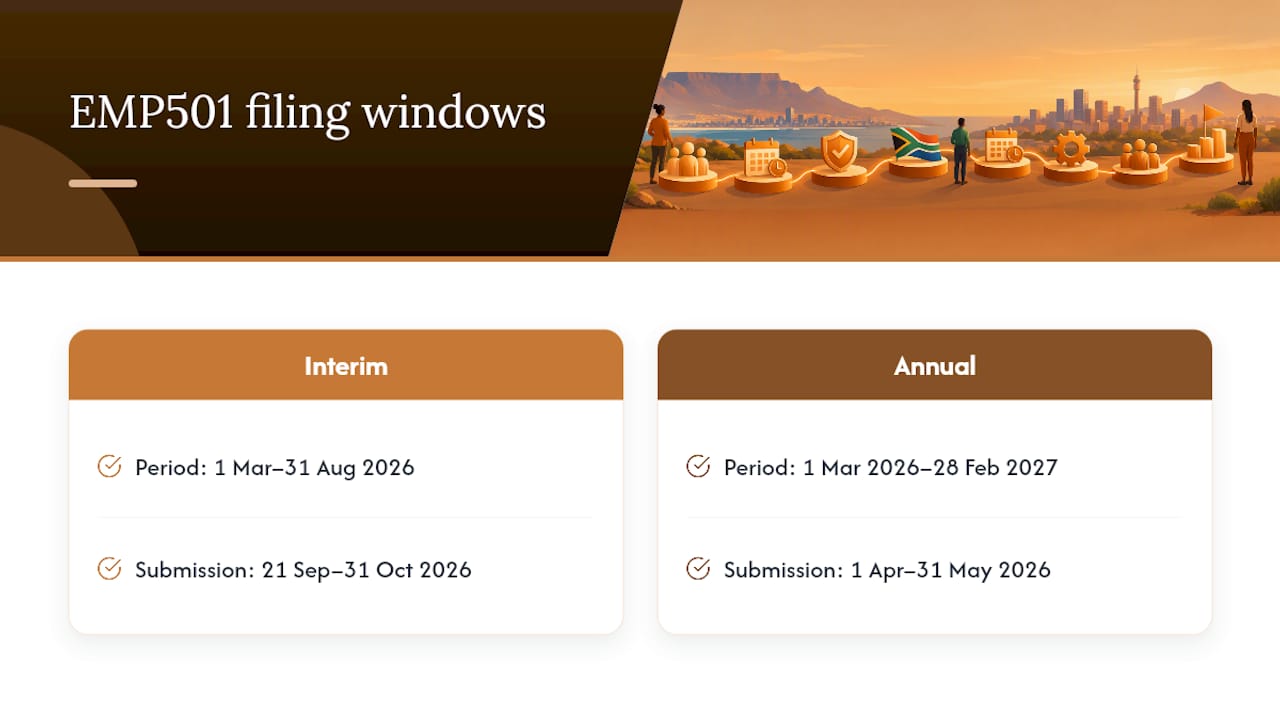
The interim reconciliation covers the six months from March 1 to August 31, 2026, with a submission window of September 21 to October 31, 2026. The annual reconciliation covers the full tax year, March 1, 2026 to February 28, 2027, and opens for submission April 1 to May 31, 2026.
These dates are published fresh each cycle, so confirm the current-year notice on the SARS website and the government gazette before you build your internal deadline. Don’t rely on last year’s dates carried forward in a spreadsheet.
How Do You Submit the EMP501 Return?
SARS gives you three channels, and which one applies depends on how many certificates you’re issuing.
e@syFile Employer works for every employer regardless of size, and it’s the only channel that handles ETI properly at scale. eFiling supports direct imports if you have 50 or fewer IRP5/IT3(a) certificates. A service center appointment exists for employers issuing five or fewer certificates who genuinely cannot use an electronic channel.
Once you’ve picked a channel, the request-and-submit sequence looks like this:
- Confirm your channel eligibility based on certificate count and pick e@syFile or eFiling accordingly.
- Download the latest e@syFile Employer build before you start. An outdated version is a common, avoidable cause of import failures.
- Align your payroll CSV export to the current BRS layout. Field order, certificate numbering, and reference formats all matter at the file level.
- Verify every employee’s income tax reference number is valid and present before you touch the request-return step.
- Request the return and choose Accept Data where possible. SARS pre-populates employer demographic details, liabilities, and payments, which reduces manual entry errors.
- Avoid Own Values if you’re claiming ETI. Own Values does not populate ETI fields, so ETI employers who select it risk losing the claim entirely.
- Use Reinstate ETI only when appropriate, typically after a prior submission incorrectly zeroed out or dropped ETI values you’re entitled to.
- Collect payment confirmations and certificate exports as a matching set before final submission, not scattered across different systems.
Pro Tip: If you manage payroll for a business with fewer than 50 employees, test your CSV import on eFiling a week before the deadline. A failed import on day one of the window still leaves you time to fix it. A failed import on the last day does not.
Why Do EMP501 Submissions Fail Validation?
Structural validation is not the same as a totals check. SARS runs your files against the PAYE Business Requirement Specification and an annually updated validation guide, and those rules govern field formats, not just balances. A file can balance perfectly at the totals level and still get rejected because a single field doesn’t match the expected structure.
The failures that show up most often include:
- Missing or invalid income tax reference numbers, often from new hires whose numbers were never captured
- Certificate numbering or period-code mismatches between what payroll generated and what SARS expects
- Incorrect CSV field formats, frequently from payroll systems exporting in a legacy layout
- ETI field errors, particularly where the ETI period or amount doesn’t align with what was declared on EMP201
Because these are machine-level checks against a published specification, your payroll-system administrator needs to be part of the reconciliation process, not just the person running month-end totals. A totals-focused finance reviewer can sign off on numbers that still fail the structural check entirely.
What Should You Check Before Requesting the Return?
Run this sequence before you touch the request-return button in e@syFile or eFiling:
- Confirm every EMP201 for the period has actually been submitted, not just calculated
- Verify payments are posted and reconciled, excluding any penalty or interest amounts paid separately
- Export IRP5/IT3(a) certificate files and check tax reference numbers against your latest payroll master data
- Confirm ETI months and claimed amounts match what was declared on each corresponding EMP201
The errors that derail most reconciliations are mundane. A mismatched EMP201 total usually traces back to a late adjustment that was corrected in payroll but never resubmitted to SARS. A missing payment is often a timing issue, where the bank processed it after month end but payroll recorded it in the earlier period. Duplicate or missing certificates typically come from an employee who was terminated and rehired within the same tax year without the payroll system treating that as two distinct employment periods.
Pro Tip: Keep a running correction log every time you adjust a submitted EMP201 or certificate. When SARS queries a discrepancy six months later, that log is the difference between a five-minute explanation and a two-week investigation.
Retain proof of payment, payroll export files, your correction log, and every submission acknowledgment for five years. SARS compliance reviews and audits routinely request this exact document set, and reconstructing it after the fact from memory is far harder than filing it as you go.
How Do You Fix a Failed EMP501 Reconciliation?
Start by isolating which specific months caused the imbalance, then gather the supporting evidence: payroll exports, bank payment slips, and the original EMP201 submissions for that period.
- Determine the correction type. If a certificate was wrong, use EMP601 to cancel the affected certificate range and reissue a corrected IRP5/IT3(a). If the return itself was saved but not finalized, you may be able to open and edit it directly.
- Escalate to full resubmission when the underlying data is wrong at the source, not just the certificate. This applies when payroll totals themselves need restating, not just the document generated from them.
- Handle ETI reinstatement separately and carefully. It carries its own timing constraints, and reinstating it incorrectly can trigger a fresh balancing failure on top of the one you’re fixing.
- Expect potential interest and penalties on any resulting shortfall, since SARS typically attributes PAYE differences to the final month of the reconciliation period once a correction is processed.
What Payroll Teams Consistently Get Wrong About EMP501
Treat EMP501 as a three-way control problem, not a form-filling exercise. Employers who move through reconciliation with the least friction reconcile payroll totals against bank payments and certificate totals well before the SARS window opens, not during it. Keep versioned CSV exports and a correction log year-round, loop in your payroll-system owner before filing season starts, and where possible, test an import in a sandbox or off-cycle run so the first real attempt isn’t also the first attempt under deadline pressure.
— Roel
Get Statutory Payroll Compliance Off Your Internal Team’s Plate
If your team is stretched thin managing EMP201 filings, ETI tracking, and now a reconciliation deadline on top of it, that’s exactly the gap Expandtosouthafrica exists to close for international companies employing staff in South Africa. Local statutory payroll, PAYE filings including EMP201 and EMP501 preparation, UIF, SDL, and COIDA compliance through a licensed local partner can reduce reconciliation risk by assigning it to specialists who manage it every filing cycle, not just twice a year.

Outsourcing makes the most sense when internal payroll capacity is limited, when you’re managing employment across multiple jurisdictions and South Africa is just one piece of a larger puzzle, or when your team has already hit repeat validation failures and needs a reset. Expandtosouthafrica’s Employer of Record services start from £299 per month per employee, with no setup fees or currency loading added on top. Check current pricing and plan details to see whether a managed option fits your situation better than continuing to run reconciliation in house.
FAQ
When Should EMP501 Be Submitted?
EMP501 is submitted during two fixed annual windows: the interim period, running September 21 to October 31, 2026, covering March through August, and the annual period, running April 1 to May 31, 2026, covering the full March to February tax year. Confirm dates on the current SARS notice each cycle, since they’re republished annually.
How Do I Submit the EMP501 Return on SARS eFiling?
You can request and submit EMP501 directly on eFiling if you have 50 or fewer IRP5/IT3(a) certificates. Larger employers use e@syFile Employer instead, which handles any certificate volume and manages ETI data correctly.
What Is the Purpose of the EMP501 Form?
EMP501 reconciles your EMP201 monthly declarations, actual payments made to SARS, and the IRP5/IT3(a) certificates issued to employees, confirming all three match for PAYE, SDL, UIF, and ETI. A failed reconciliation blocks certificate pre-population on employee tax returns and can trigger SARS follow-up letters or penalties.
What Is the Difference Between EMP201 and EMP501?
EMP201 is the monthly declaration you file every time you pay employees, showing PAYE, SDL, and UIF owed for that month. EMP501 is the bi-annual and annual reconciliation that checks all those monthly EMP201s against actual payments and issued tax certificates to confirm nothing was missed or misreported.
What Happens If My EMP501 Doesn’t Balance?
SARS will typically issue a letter identifying the discrepancy, and unresolved imbalances prevent employee certificates from pre-populating correctly. Depending on the cause, you may need to cancel and reissue certificates through EMP601, correct an EMP201, or resubmit the full EMP501, with potential interest applied to any resulting shortfall.